
Introduction: the question every maker asks
I’ve been learning about ngrok lately, and at first I struggled to understand how it differed from my current Raspberry Pi + Telegram setup. If I already control my Pi from my phone with a bot like Hermes, why would I need ngrok on top of that?
Both feel like “remote access to the Raspberry”, and it’s tempting to think they compete. They don’t. They solve different problems:
Hermes + Telegram and ngrok solve different problems. They’re not alternatives to each other — they’re layers that complement each other in the same connectivity stack.
Hermes is a conversational channel — a private chat between you and your Pi. ngrok is a network tunnel — it turns a service running at home into a public URL that anyone on the internet can call.
What I’m sharing here is what became clear to me after hours of testing both: what really separates them, when one wins over the other, and when the best move is to use them together.
How does Hermes with Telegram work?
Hermes is an open-source AI agent that runs on the Raspberry Pi. It connects to Telegram through a bot, and from there you can:
- Run commands on the Pi’s terminal
- Create files and notes
- Schedule tasks (cron jobs)
- Query local AI models like Ollama
- Integrate with Home Assistant, n8n, GitHub, HubSpot, and more
The architecture
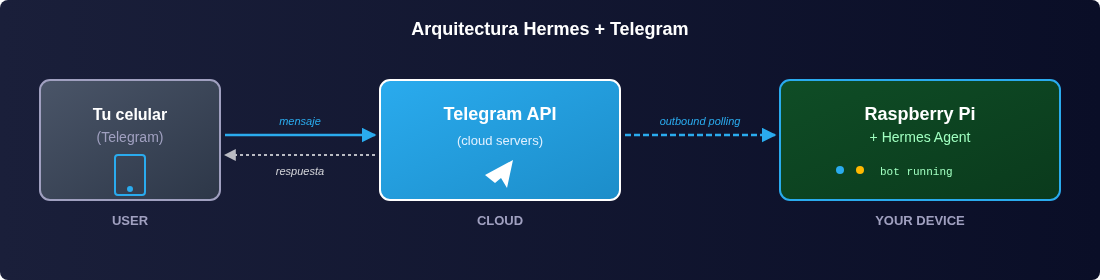
You always initiate the flow, from your phone:
- You open Telegram and send a message to the bot (for example,
/ollama what is a transformer?) - The bot forwards the message to Hermes, which is running on the Pi
- Hermes interprets the command and runs it locally (queries Ollama, reads a file, launches a script)
- The Pi responds to the bot, and the bot sends the reply back to Telegram
All communication goes outbound from the Pi to Telegram’s servers. The Pi is never “exposed” to the internet — which keeps it secure by design.
Use cases where it shines
- Querying local models (Ollama) without opening remote terminals
- Administering the Pi from your phone: restart services, check logs, create files
- Personal automations: a cron runs a task and notifies you on Telegram when it finishes
- Quick notes by voice or text that get saved to your Obsidian vault
- Controlling Home Assistant with natural-language commands
What you need to keep in mind
Telegram gives you privacy by chat_id. Only your personal chat_id can talk to the bot. Nobody else can interact with it, not even by guessing the username. That’s the biggest strength of this model: the Pi never listens for incoming connections.
How does ngrok work?
ngrok does something conceptually opposite: instead of a private chat channel, it gives you a public internet URL that points to a service living on your Raspberry.
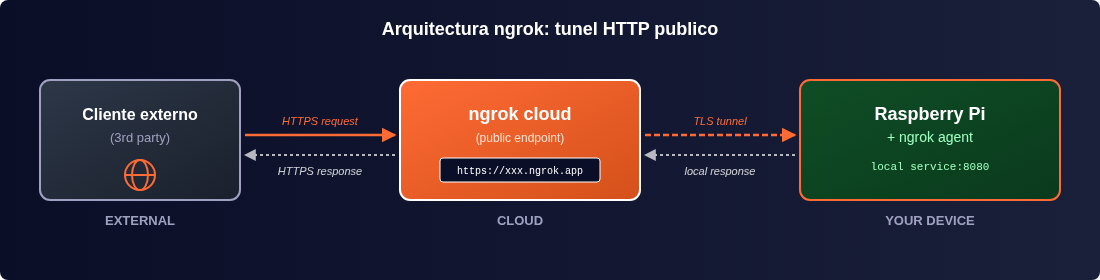
The flow is the inverse of Telegram’s:
- The Pi initiates an outbound connection to ngrok’s cloud (same as with Telegram)
- ngrok assigns a public URL that points to a local service
- Anyone or any system on the internet can access that URL
- ngrok forwards the requests to your local service through the encrypted tunnel
Use cases where I ended up using it
- Receiving webhooks from external services (GitHub, Stripe, HubSpot, Slack)
- Sharing an API in development with a client or teammate
- Live demos of an app running on my Pi
- Testing integrations that need a real public URL
What you need to keep in mind
Unlike Telegram, the ngrok URL is public and anyone who knows it can hit your service. There’s no authorized chat_id. That’s why it’s powerful, but it also means you have to implement your own authentication: API keys, JWT, OAuth, IP whitelisting — whatever fits the case.
Another practical detail: on the free plan, the URL changes every time you restart the tunnel. That’s a problem for persistent webhooks like GitHub’s or Stripe’s, which memorize the URL the first time. For those cases you need a fixed subdomain (paid plan) or a custom domain.
Direct comparison: the table I wish I’d had from the start
If I had to boil it all down into a single view:
| Feature | Hermes + Telegram | ngrok |
|---|---|---|
| Type of access | Private conversational channel (1 to 1) | Public network tunnel (1 to many) |
| Who initiates the connection? | You, from Telegram | Any external service |
| Traffic direction | Outbound (Pi → Telegram) | Outbound (Pi → ngrok) + Public inbound |
| Interface | Natural-language chat | HTTP / HTTPS |
| Security by default | High (whitelist by chat_id) | Low (public URL, requires your auth) |
| Best for | Commands, queries, personal automation | Webhooks, demos, APIs in development |
| Firewall config required? | No | No (outbound) |
| Cost | Free (Telegram) | Limited free / $8+/month |
| Persistent URL | N/A | Paid plan only |
Seven real cases where I tested each one
What helped me understand it the most was seeing concrete examples. These are the ones I tried on my own Pi.
Case 1: Querying Ollama from your phone (Hermes)
I have Ollama running on the Pi with a local model. I want to ask it technical questions without opening a terminal.
# Ollama runs on localhost:11434
ollama serve

# Hermes connects to Ollama and exposes it as a Telegram chat
# You type: /ollama what is a transformer?
# Telegram replies with the local model's answer
Why Hermes and not ngrok here? Because I’m the only user, and the natural interface is a chat.
Case 2: Receiving HubSpot webhooks (ngrok)
When a new lead comes in on HubSpot, I want the Pi to process it (for example, calling an Ollama model that classifies the lead).
# Your Flask API on the Pi runs on localhost:5000/hubspot-webhook
# ngrok exposes it publicly
ngrok http 5000

# Public URL: https://a1b2c3d4.ngrok-free.app
# In HubSpot you configure the webhook:
#   https://a1b2c3d4.ngrok-free.app/hubspot-webhook
# HubSpot POSTs every time a new lead arrives
Why ngrok and not Telegram here? Because HubSpot is the one initiating the communication, not me. HubSpot doesn’t know how to speak Telegram — it needs a public HTTP URL.
Case 3: GitHub webhooks (ngrok)
Every time I git push to a repo, I want the Raspberry to run tests automatically.
ngrok http 8080

# In GitHub repo Settings > Webhooks:
#   Payload URL: https://a1b2c3d4.ngrok-free.app/webhook
#   Content type: application/json
#   Events: push
Same pattern: GitHub initiates the connection, needs a public URL.
Case 4: Stripe (ngrok)
Stripe pays you and sends a confirmation webhook. The Raspberry receives it and marks the order as paid in a local database.
Case 5: Slack (ngrok)
Slack slash commands also need a public URL to respond in under 3 seconds.
Case 6: n8n with external webhooks (ngrok)
n8n runs automated workflows. If a workflow starts with a webhook trigger, that webhook needs a public URL. ngrok handles that perfectly.
Case 7: Mobile app consuming your API (ngrok)
I’m building a React Native app that consumes an API living on the Pi. ngrok gives it a public URL so the app can make requests during development.
When should you use both together?
The case where combining them helped me the most: a monitoring dashboard for my Raspberry.
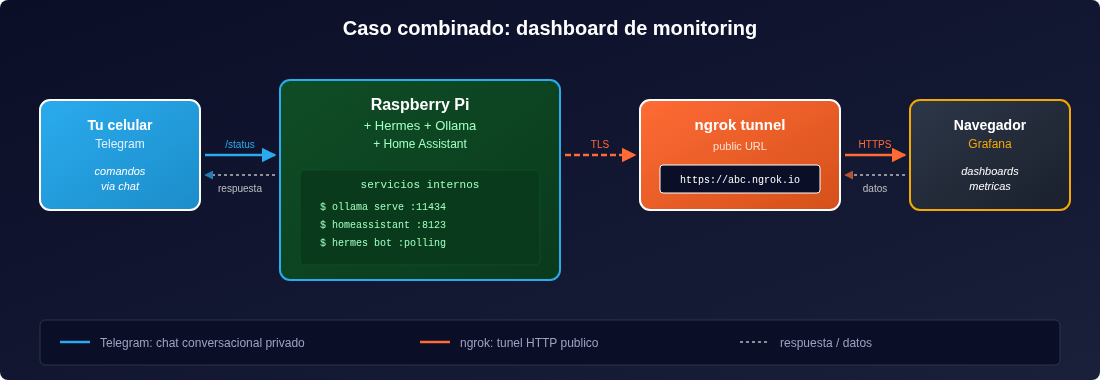
The idea:
- I have Grafana running on the Pi showing CPU, RAM, temperature, and metrics from my services
- I want to view the dashboard from my phone when I’m away from home → ngrok exposes Grafana with basic auth
- I want to ask the Pi things while reviewing the dashboard → Telegram with Hermes to ask “which service is consuming the most CPU” or restart something
Quick implementation on the Pi:
# Grafana runs on localhost:3000
docker run -d -p 3000:3000 grafana/grafana

# ngrok exposes Grafana with authentication
ngrok http 3000 --basic-auth "lila:supersecret"
Then, a Flask API that answers the Telegram bot’s questions:
@app.route("/ask", methods=["POST"])
def ask():
    question = request.json["question"]
    answer = ollama.generate(question)
    return {"answer": answer}

# ngrok exposes /ask
# https://a1b2c3d4.ngrok-free.app/ask
Meanwhile, I keep chatting with the Pi from Telegram as usual. Two interfaces, one Pi: the chat for me, the public URL for Grafana and the rest of the world.
What I learned about security using them
The two tools need different care. Security by default is high in Telegram, low in ngrok.
For Hermes + Telegram
- Restrict the
chat_id: only your personal chat_id can talk to the bot. This closes 99% of the attack vectors. - Tokens in environment variables: never in the code, not even in private repos.
- Explicit confirmation for sensitive commands (shutting down services, deploys, deleting files).
ALLOWED_CHAT_ID = 123456789  # only this chat_id can use the bot
if message.chat.id != ALLOWED_CHAT_ID:
    return "Access denied"
For ngrok
- Mandatory authentication on your service: API key, JWT, OAuth, ngrok’s own basic-auth
- Rate limiting on your service (e.g.,
flask-limiter), since ngrok doesn’t provide it - HTTPS only: make sure your service doesn’t accept plain HTTP, even though ngrok already encrypts the tunnel
- IP whitelisting when you know where the requests come from (e.g., HubSpot’s or GitHub’s IP ranges)
- Active logs: review
ngrok.logoften to spot suspicious access - Expose only what’s needed: if you only need a webhook, expose that endpoint, not the whole Pi
# ngrok config.yml with authentication and whitelist
tunnels:
  hubspot-webhook:
    proto: http
    addr: 5000
    auth: "user:strong_password_here"
    ip_policy:
      allow:
        - "54.174.0.0/16"  # HubSpot's IP ranges
Principles I always apply
- Least privilege: expose the bare minimum
- Secrets in
.envwith600permissions, never committed - Periodic rotation of tokens and API keys
- Alerts when something weird happens (unexpected login, request to a strange endpoint)
- Free ngrok is not for production: URLs change on every restart. For production, use a custom domain or a self-hosted alternative.
ngrok alternatives I tested
ngrok is the most famous, but not the only one. Here’s what’s worth looking at depending on the case:
| Solution | Best for | Cost | Security |
|---|---|---|---|
| ngrok | Demos, quick dev, temporary webhooks | Free / $8+/month | Medium (requires your own auth) |
| Cloudflare Tunnel | Production, critical webhooks | Generous free tier | High |
| Tailscale Funnel | Tailscale networks, maximum encryption | Free / $5+/month | Very high |
| Nginx + VPS | Self-hosted production | $5-10/month | High (if done well) |
| VPN | Private personal access | Free (WireGuard) | Very high |
| Port forwarding | Avoid except for specific cases | Free | Low |
I stuck with Cloudflare Tunnel for production and ngrok for quick dev. If you already use Tailscale on your network, Funnel is almost automatic.
Conclusion: it’s not this or that, it’s this and that
After several weeks using them in parallel, what became clear to me is that you don’t have to choose. They’re tools for different problems:
- If you want to talk to your Pi from your phone → Hermes + Telegram
- If you want external services to reach your Pi (webhooks, APIs, demos) → ngrok
- If you want both at the same time (a public dashboard + private commands) → both, no conflicts
The initial confusion is normal: both feel like “remote access” and they get mixed up. But the difference is conceptual, not about size. One is a chat channel; the other, a network tunnel. One is private by design; the other, public by design. One you initiate; the other, the outside world initiates.
If you went through the same thing I did at the beginning, I hope this comparison saves you the hours it took me to put together. And if you found a better way to combine them, I’d love to read about it in the comments.
Frequently asked questions
Can I just use Telegram and forget about ngrok?
Yes, for everything that involves you initiating the communication (commands, queries, personal automations). No, for receiving webhooks from external services that need to POST to a public URL.
What about the reverse? ngrok alone, no Telegram?
That works too, but you lose the conversational interface. If what you do most is chat with the Pi, the Telegram chat is more natural than opening URLs from the browser.
Is it safe to expose my Raspberry with ngrok?
It’s safe if you implement your own authentication on the service (API key, JWT, basic-auth). ngrok doesn’t give you that for free. If you expose an unauthenticated endpoint, anyone who discovers the URL can make requests.
How much does ngrok cost?
The free plan gives you a random URL that changes on every restart. The $8/month plan gives you a fixed subdomain. For persistent webhooks (GitHub, Stripe) you need a paid plan or a custom domain.
What other alternatives to ngrok are there?
Cloudflare Tunnel (free and very secure), Tailscale Funnel (if you already use Tailscale), Nginx + VPS for serious production, or WireGuard if you only want personal access without exposing anything to the internet.
Does Hermes work with services other than Telegram?
Yes. Hermes can integrate with Discord, Slack, email, direct command line, and HTTP webhooks. Telegram is the most comfortable interface for personal use, but it’s not the only one.